Reseñas de la Samsung Galaxy Tab S10 FE: ¿Vale la pena?
¿Buscas reseñas fiables de la Samsung Galaxy Tab S10 FE? HasTrust otorga a la Tab S10 FE y FE+ una puntuación de confianza de 100/100 (De confianza), que refleja su reputación como tabletas fiables y con buena relación calidad-precio. Carecen de las pantallas OLED de gama alta y del rendimiento de primer nivel, pero el S Pen y la construcción con certificación IP68 las convierten en una opción práctica para estudiantes y el uso cotidiano.
¿Por qué esta puntuación?
La Samsung Galaxy Tab S10 FE y FE+ son tabletas fiables y muy recomendables que ofrecen una excelente relación calidad-precio para estudiantes y usuarios ocasionales. Aunque carecen de las pantallas OLED premium y del rendimiento de gama alta de los modelos insignia, son perfectamente capaces para tareas cotidianas, multitarea y toma de notas. La inclusión del S Pen y el diseño resistente con certificación IP68 las convierten en una opción sólida y práctica para su precio.

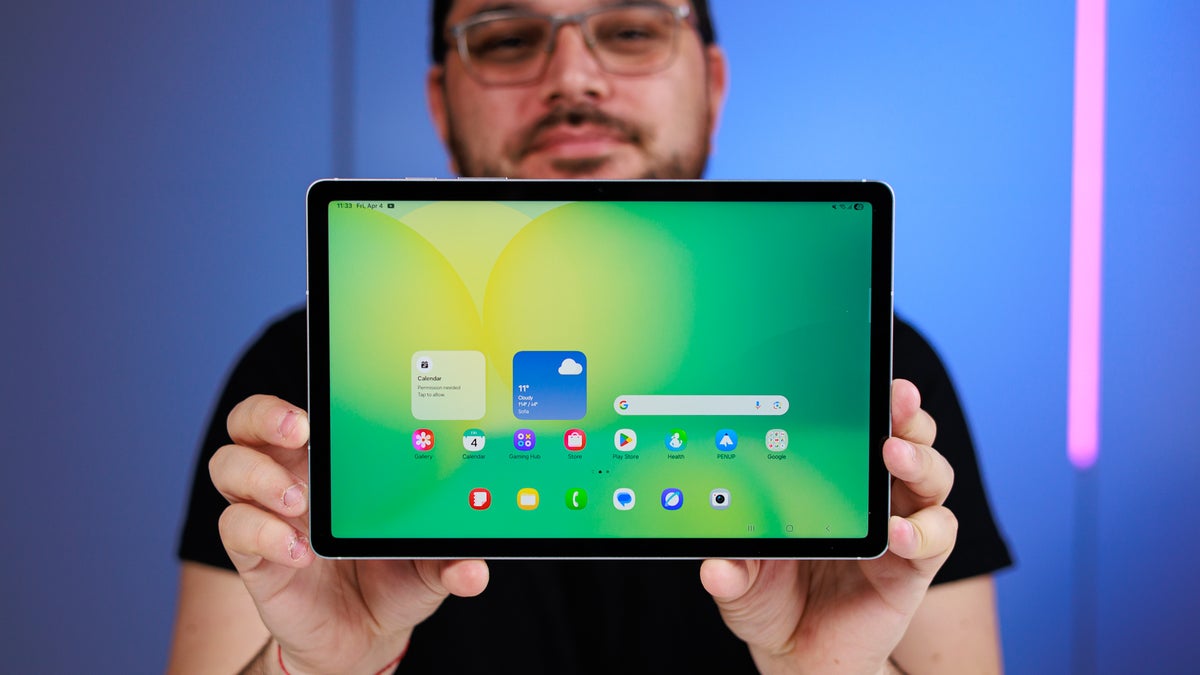


Reseñas en vídeo
Pros
- Excelente relación calidad-precio para la mayoría de los usuarios
- Incluye un lápiz óptico S Pen sin batería y con buena respuesta
- Diseño resistente con certificación IP68
- Muy buena duración de la batería
- Rendimiento capaz para tareas cotidianas como streaming, navegación y toma de notas
Contras
- La pantalla LCD es inferior a los paneles OLED
- No incluye adaptador de corriente
- No tiene una ranura de almacenamiento dedicada para el S Pen en el dispositivo
- El rendimiento puede no cumplir las expectativas de los usuarios exigentes para su precio
- Limitada a velocidades USB 2.0
Señales de seguridad
Datos
Mejores opciones
Por qué cambiar: Si se encuentra a un precio similar, la S9 ofrece una pantalla OLED superior en comparación con el panel LCD de la S10 FE.
Descrita como una fuerte competidora y, potencialmente, una mejor tableta en general.
Basado en 8 fuentes
Galaxy Tab S10 FE & FE Plus | Tablets | Samsung USGalaxy Tab S10 FE WiFi 10.9” Tablet | Specs | Samsung UKSamsung Galaxy Tab S10 FE Review: The budget tablet that just makes sense - PhoneArenaSamsung Galaxy Tab S10 FE - Notebookcheck Reviews CollectionSamsung Galaxy Tab S10 FE review: The Goldilocks of the Galaxy | WhistleOutSamsung Galaxy S10 FE+ Review: Large Android tablet with price focus and fabulous run times - NotebookCheck.net ReviewsSamsung Galaxy Tab S10 FE 5G Tablet Review - Consumer ReportsSamsung Galaxy Tab S10 FE Plus Review: Larger screen, fewer cameras, but great value - PhoneArena🛡️ Chequeo de seguridad
Qué deberías hacer
- Aun así, paga con protección al comprador (tarjeta de crédito o PayPal), nunca por transferencia bancaria.
- Revisa la política de devoluciones y el plazo de entrega antes de pedir.
- Seguimos vigilando este sitio — vuelve aquí si algo te resulta extraño más adelante.
Informes de compradores
Aún no hay informes — ¿compraste aquí? Sé el primero en compartir.
Los comentarios se revisan antes de aparecer. El recuento se actualiza al instante.
Comprobado hace 49 días. · Cómo puntuamos →
Preguntas frecuentes
¿Es Samsung Galaxy Tab S10 FE/FE+ de fiar?⌄
De confianza. Puntuación de confianza de HasTrust: 100/100. La Samsung Galaxy Tab S10 FE y FE+ son tabletas fiables y muy recomendables que ofrecen una excelente relación calidad-precio para estudiantes y usuarios ocasionales. Aunque carecen de las pantallas OLED premium y del rendimiento de gama alta de los modelos insignia, son perfectamente capaces para tareas cotidianas, multitarea y toma de notas. La inclusión del S Pen y el diseño resistente con certificación IP68 las convierten en una opción sólida y práctica para su precio.
¿Es Samsung Galaxy Tab S10 FE/FE+ una estafa?⌄
Nuestra comprobación no encontró señales graves de estafa, pero verifica siempre el pago y el vendedor antes de pagar.
¿Cuál es la puntuación de confianza de Samsung Galaxy Tab S10 FE/FE+?⌄
HasTrust califica a Samsung Galaxy Tab S10 FE/FE+ con 100/100 (De confianza). Comprar
🔔 Email me if this shop's trust rating changes
Free. You confirm by email (double opt-in); unsubscribe any time.
📖 Guías útiles
Otros también comprobaron



Muestra tu puntuación de HasTrust en vivo en tu propio sitio — enlaza aquí para que los visitantes vean la comprobación completa. Cómo funciona ↗

📬 Nuevas estafas en tu correo — cada semana
Un correo breve cada lunes: las tiendas fraudulentas y sitios de riesgo detectados esa semana. Sin spam, baja con un clic.
Doble confirmación — solo te escribimos tras confirmar.